Regulus - New Wordpress Theme released
November 13, 2005 | Regulus
Towards the end of the Bubble Blitz developement I started work on my first Wordpress theme. The making of it kind of stopped and started for quite a while since there were things I wanted to do that I couldn’t.
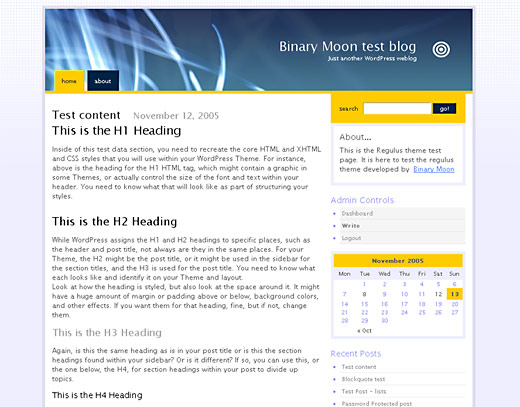
The idea behind the theme was to create a very simple to customise theme for the novice blogger. One of the problems with Kubrick is that it’s the default theme for Wordpress but it is not straight forward to edit; therefore many sites use the default layout and don’t change anything. I wanted something that looked equally nice but could be changed easily so that there aren’t hundreds of sites out there using a single theme that look identical. Obviously I don’t expect there to be hundreds of sites using Regulus since it’s never going to be the default theme, but I figured I would make things easy to change anyway.
Regulus Admin panel
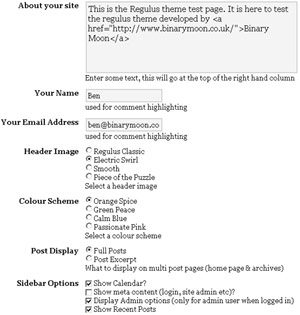
The main new feature that isn’t hugely common (and the reason it took a while to complete) is an admin panel built into the Wordpress admin system that let’s you edit the layout of the site without actually changing any code. To do this I used the wonderful Wordpress Theme Toolkit, developed by Ozh, from Planet Ozh.
The admin panel let’s you edit the content of the sidebar so that you can show and hide the things you want to see. You also have the option to change the header graphic, and edit the colour scheme of the site. These edits are hard coded into the site but if (when?) I create another theme I think I will attempt to make it even easier to change things so you can use any colour scheme or graphics that you chose. Obviously more advanced users can change the colours themselves, but they’re not who this theme is aimed at (they’re welcome to use it if they want though
).
Regulus Plugins
I also built in support for a number of plugins developed by other Wordpress developers. These plugins have been included in the core theme code so that no additional downloads are required. The plugins I used were:
- Wordpress Admin Bar 2 - by Matt Read (his website appears to be down at the moment but I’ll leave this in case it comes back online)
- the_excerpt Reloaded - by Kaf Oseo
- Author Highlight - by Jonathan Leighton
These are all plugins I use here, on Binary Moon, and I really like them so figured I should include them as standard. I changed the plugin names so that if you already have any of them installed there should be no clashes.
How do you get it…?
The good stuff
Known Problems
The only bug I’m aware of is that in Internet Explorer (damn you IE) the label ‘message’ is listed twice when it should only appear once (it’s only in the code once…). If anyone has any idea why this happens I’d love to hear from you.
Anything else?
Since this is my first Wordpress theme I’m pretty confident that there are things I have forgotten, or not done, so I will no doubt release a few updates in the next week or two. Let me know if there are any problems and I will do my best to fix them.

Comments
November 14, 2005
Good job Ben! Nice colour scheme and I like the use of the admin panel. I’m not fond of the building in of the plugins but apart from that, well done!
November 14, 2005
Thanks for the comments Phu
I included the plugins because I wanted it to be as easy as possible to use for everyone. It saves people from having to download, then upload, and then enable, the plugins themselves.
November 14, 2005
Updated the download to fix a couple of issues with margins in lists, and the comments (which are made with a list)
November 15, 2005
Ben, thank you very much. I’ll use this for my other blog. Again, well done
November 15, 2005
Ben,
I test your Regulus theme on my WP 1.6 Alpha blog and break it.
I think is something on the Theme Toolkit.
And another error when show index:
Cannot redeclare writeabout() in (…) /regulus/functions.php:61
November 15, 2005
Oskar - thanks
bicherele - I’m not supporting alpha software. Once WP 1.6 is released I will look into it but until then I don’t care. The writeabout() command is slightly more worrying but I suspect that’s a 1.6 error as well. Thanks for trying it though - it is appreciated (despite how it might sound).
November 15, 2005
Nice theme indeed.
I only edited the sidebar.php to allow for a larger listing of monthly archives.
November 15, 2005
Miladus - thanks for the compliment. The reason I limited the archives was that I figured (and this is an assumption) that people who visit sites rarely use the monthly archive to find things. I don’t have a clue when something was posted unless it was within the last few weeks. Categories and search are far more important so those are listed clearly. Maybe I should add an option in the admin panel that lets you either limit the list as I have it or display everything as you’ve done.
November 15, 2005
Amazing skin. Thumbs up!
November 15, 2005
Ivan - thanks a lot - makes me feel good to hear things like that
Everyone - I have made some more changes to the theme and updated it. To get the latest version just download it again from the same location. Changes include a randomized link list, an adjusted category listing (sub categories are displayed as such) and the ability to choose how the monthly archives are laid out.
November 15, 2005
Very nice theme! A couple of silly questions: do you plan to create a three-column theme out of it? If not (sorry for asking that! :-)), how can I “enlarge” the theme in order to minimize margins?
November 15, 2005
Mario - I’ve got no plans to make a 3 column version of it at this time. As for an enlarged version… you mean a version that scales with the browser window? That could be interesting, not sure how hard it would be. I’ll look into it - the only problem I can see would be the header graphics not scaling/ fitting, I’d need to come up with an elegant solution to that I think.
November 16, 2005
Ben: Adding an option in the Admin Panel is an excellent idea, especially for blogs where the archives tend to be more important or at least attract more readers.
Another issues is what happens if you have a large number of Pages on a blog?
November 16, 2005
Hi there!
I just downloaded your theme and installed it!
It’s beautiful!
I love how clean and sharp it is.
I have a question though?
What happens to the sub-pages? (parented pages)
Anything I put another another page I can’t find. Or for some reason is just not showing up for me.
Can you help me out?
I’m running it on a test blog for now… but could you pop over to see what I mean… or you probably don’t even need to look at it…
Thanks for the help in advance!
November 16, 2005
oops! LOL
My test blog is at:
www.littleovulation.net
Sorry about that.
*geez*
November 16, 2005
Is there a way to show “Last xx comments” like “Recent posts” ?
November 16, 2005
Miladus - I’ve added the toption to the admin panel now so you can do whatever you like
The lots of pages problem is something people will have to work around themselves. The way I have it at the moment is the same way k2 works so I don’t think it’s that bad.
La Bella - thank you very much
- Because of your comments I have just spent the last hour adding a sub pages menu to the left hand sidebar. If there are sub pages on the current page they will be listed there. Just download and reupload from the link above. To save editing all of your css again, look for the #sidebar #subpages in the style.css and switch.css files. You’ll need to update the sidebar.php and the header.php files as well. Just redownload from the normal link.
Dener - I’ve never used any last comments plugins. I will think about adding it but I wouldn’t have thought it was too difficult to do yourself either
November 16, 2005
oohhhh Ben, you RAWCK man!

I love it!
I love how they are listed on the side bar.
LOVE it!
*whoohoo* I’m so happy.
Really, thanks so much. A lady appreciates it.
November 17, 2005
Hey Ben! I’m back. LOL [again]
Ok… Now I’m with Dener here.
How can we add any other plugin to display on the sidebar? I’m getting confused as to what the default/basic code is to use.
I’ve tried infinte times already to add the recent commens plugin I have and no luck.
Would there be anway you can kind of guide me here as to what type of code I am to follow to make it display?
I hope you can help, if not, I understand.

A lot of work trying to fix other peoples’ problems!
Btw, I have it running now on my main blog.
www.la-bella.net
Love it!
November 17, 2005
Ben, I really appreciate the work you have done. This is the first time I see the theme toolkit in action.
Two minor flaws that I’ve discovered:
The em-format is not visible in posts.
The footer doesn’t show in the Safari browser.
November 17, 2005
La Bella - loving the pink theme - it looks great.
I would have thought adding the recent comments plugin was pretty easy. I know others have added it with success. If you give me a link to the plugin I’ll take a look.
J - thanks
I always forget about the em’s and strongs, I set the font globally at the top of every css file and it overwrites things. If I remember correctly all you need to do is add
#content em { font-style:italic; }to the style.css file. I may have got something wrong there though - I’m at work so can’t test it.
I don’t have a mac to test things with either I’m afraid. I’ll have to hope someone else can work that one out for me
November 17, 2005
Many Thanks.
November 17, 2005
Superb job on this - I’ve installed over at www.mattrutherford.com and am starting to tidy up…I’ll also need to get my flickr badge working again - but seriously - its a brilliant theme.
A couple of questions:
1. How do I use ‘boxes’ - they look excellent, but can’t work out how to post into one…
2. Is there a way to ‘omit’ a page from the navbar -I sometimes work in draft there and don’t show them off.
November 17, 2005
Matt - I’m not sure what you mean by ‘boxes’ could you explain more?
Also the ommiting pages from the nav bar, it’s a good idea but I haven’t got a clue how to do something like that. I will see if it’s possible but can’t promise anything.
November 17, 2005
Ben - in the regulus live preview (http://beta.binarymoon.co.uk/) - under the section titled ‘Your CSS Here - H3 Heading’.
there are boxes…which are uber-cool! Are they part of the regulus implementation?
I’m also having trouble getting my pictures to look as they did before…but I know I’ll get there, I’m learning every minute!
November 17, 2005
That box has nothing to do with Regulus. It’s actually part of some sample code used to make sure themes have all the neccessary styles included.
The box with the dashed border is a div element with the styles built in. The code is…
<div style="border: 2px dashed blue; margin: 5px; padding: 8px; float: right; width: 30%; font-size: 85%;">The stuff you want to have in a box
</div>
November 17, 2005
Howdy everyone. Another new version is online. I’ve now added support for the very cool recent comments plugin from Krischan Jodies.
I’ve also changed the protected posts page so that you can’t post comments without entering a password (doh - stupid mistake there).
November 17, 2005
awwwwww man!
Ok… LOL So… for the protected page post update, which file am I looking to update here.
I’d hate to lose all my css settings. :-S
And thanks alot for updating the theme to show recent comments.
November 17, 2005
You need to change comments.php - I only added line 7 so you shouldn’t need to change anything else.
November 17, 2005
Awesome!
Thanks again… btw, I set my recent comments already.
I think it looks great. Simple is always better.
You know I can honestly say that you are the most “approachable” theme author I’ve come across. You have gone out of your way to help everyone out.
You don’t get that very often. I gotta be honest and say I only ask for help when I need it. Not cause I am lazy and want someone to do it for me. I am glad you understand that.
Blessings*
November 18, 2005
gorgeous
if I hadn’t been spending the last three days working on my own I’d take it in an instant
November 18, 2005
A very good theme! Excellent! Congratulations!!!!!!!
November 18, 2005
La Bella - I live to please
I’m sure I’ll stop being helpful soon enough. You should make the most of it while you can!
Jesse & Matteo - thanks
I’m off on holiday for the weekend so will moderate all the new comments and reply to things when I get back on Monday. Have a good weekend everyone.
November 18, 2005
Nice theme but few things needs to be fixed.
1. Paragraph align in id content should be justify to make the text look good
2. The archive tab should be selected when you view any post. (Currently it selects home tab)
3. The theme should have archive page included (I tried to add myself with the super archive code but for some reason it did not work for me)
4. It would have been better if you would have made seperate file for post template i.e. single.php this helps when a user wants to place ads just below the post title…i.e. if the post is single
But in current theme you are using same title for both single and list, so user have to give php condition to place the ad there
5. It would have been cool if you would have different options in sidebar for home page and inside pages. i.e. display few things on home page and few in inside page.
I have modified the theme a lot to get it working according to my needs, you can check it here http://www.whoisdeep.com
It would have made my / anyone’s job much easier if you had above things already present in your code
Btw let me know if you need the files I have modified..so it can save lot of your time to sit and write the stuff…
Regards,
Deep
November 19, 2005
I see wordpress release 2.0 beta already would working on that soon? Thanks
November 20, 2005
I like it. But just one niggle - with other themes I had my blogroll links seperated into catagories, and now they’re all jumbled up. Is a way to catagorise them in Regulus?
November 20, 2005
There no compatible with the Wordpress 2.0 beta¿??¡
November 21, 2005
Thanks for the kind words everyone.
Regarding wordpress 2.0 - I wasn’t even aware it existed. I won’t be supporting it anytime soon since I don’t use it. I’m sure if you’re that far ahead of the game you are knowledgeable enough to fix it yourself anyway
Val - There’s no way to sort blog roll links by category, I’ll look into it though.
Deep - Thanks for the feedback. I’ll answer them in order
1 - Justifying text is a matter of opinion. I don’t like it so won’t do it. It’s an easy change to do yourself though.
2 & 3 - that’s beyond the scope of a theme I think. You should make the archive things work yourself - especially since I wouldn’t have used the archive system you’re using.
4 - I hadn’t considered that. I don’t blog to make money. However I think the people who use adverts are generally clever enough to be able to add these things themselves (as you have done). I will consider this though as I can see other people thinking it might be useful.
5 - That’s an interesting idea. I’m not sure how it would work though. I will certainly think about it.
As I said in my post this theme was designed to be easy for people with no technical knowledge to use and abuse. People like yourself who are obviously capable of changing these things wouldn’t need something like the control panel since you can do it yourself. I appreciate the feedback though.
November 21, 2005
Ok - just seen the wordpress 2.0 beta. I will install it at home later but I suspect the problems will all be down to the theme system I’m using. I believe the new version of wordpress has it’s own control panel system so I will simply switch from the system I’m using to the new one. There’s no point doing this until something more official is announced though.
November 22, 2005
Thanks, Ben - I’ll see if I can hack something for my blogroll problem. If it works, I’ll send you the code.
November 22, 2005
Hi Ben - slightly OT question: how did you come up with the name ‘Regulus’?
November 22, 2005
Val - I’m guessing you know what Regulus is (I saw the magazine you edit on your about page), and yes, it’s the reason there is a star based header graphic.
I actually chose Regulus because of one of my more popular posts on this blog, which is all about Harry Potter.
I think any future themes I release will have star based names as well.
I’ve just had a quick look at the what you would need to change to get the link list working. The easiest thing would be to change
<h2><?php _e('Categories'); ?><ul>
<?php list_cats(0, '', 'name', 'asc', '', 1, 0, 0, 1, 1, 1, 0,'','','','',''); ?>
</ul>
to
<ul><?php get_links_list('id'); ?>
</ul>
in sidebar.php
November 23, 2005
So you won’t be supporting Wordpress 2.0? I upgraded to it and really like this theme.
November 23, 2005
Thanks Ben! I’d have got that bit of code myself eventually, but I’m a PHP beginner and I’m terrifically busy this month.
Keep doing with the star names - did you know that Regulus was one of the four “Royal Stars” of the Babylonians and thought by them to have great importance in predicting the fate of kings and states??
November 23, 2005
Carl - Currently wordpress 2.0 is out of the question but obviously I want it to work for as many people as possible so I will be looking into it. I have now tested it in the wordpress beta and can see what the problem is… I just haven’t worked out how to fix it
Val - I must admit I didn’t know that much about the Regulus system. I guess the next themes will have to be named after the other Royal stars. I was going to go for Sirius next (Regulus brother in Harry Potter) - and am guessing that’s one of the others?
November 24, 2005
No, the others are Aldebaran, Fomalhaut (sp?) and Antares. But, hey, this is your project - choose what names you want!
And the code works fine.
November 25, 2005
Ben, the only problem with the Wordpress 2.0 it’s functions.php, if you put the functions.php content into the themetoolkit.php, the problem solve.
Sorry, with my english.
November 25, 2005
spyn_et - that sounds good. I’d worked out it was loading the functions twice but didn’t even consider something like that. Far too straight forward for me
And your English is fine. I know not everyone speaks it as a first language.
Val - Ah, oh well. I’ll still go with Sirius next but will use the nicer of the others in the future
- glad the code worked for you.
November 25, 2005
I just rolled this into WP.com but had to make a few changes:
* Search form has wrong target
* Template toolkit incompatible with WP 2.0 and the new functions.php system
* No screenshot.jpg
* Comments don’t detect logged in users
* Header include invalid in 2.0
And a few other misc changes. I’d be happy to send you the code if you’re interested.
November 26, 2005
So it’s been fixed?
November 26, 2005
Carl - Not yet - it’s been added to wordpress.com though… hoorah. I am looking into it, but the fixes I have seen so far remove the admin panel which was the unique selling point (erm… unique giving away point?) of it in the first place.
Matt - that’s really cool. Thanks a lot - I’ve sent you an email to get the changes off of you.
November 27, 2005
Ben, great theme, I love it! Thanks a lot!
2 questions about the configuration panel though:
1. Your name and your e-mail address are used for comment highlighting, but what does that mean? Where can I see it in action?
2. The last option “Show all archive months” doesn’t work for me (version 1.5.2). Checked or not checked, I always get all archive months in the sidebar.
Hope you can shed some light on these issues.
November 27, 2005
Uh, ignore that last post. I’ll answer my own questions:
1. When viewing comments, your (actually, my) own comments are in a box, easily distinguishable and editable.
2. When the option is off, by default 15 months is the maximum, but this is adjustable in sidebar.php.
November 28, 2005
I really like the theme… and I just posted a modified version on my site. (I widened things to add a del.icio.us feed and changed the colors around a bit…)
But I’m having a problem with the search and it is probably the same thing that Matt alluded to. When I search from the home page, everything works fine, but when I search from within a particular post, I get errors. If you have any ideas on fixing this, I’d sure like to hear about it!
November 28, 2005
I just remembered one other thing I had to change…
You should probably call get_sidebar from within the index.php instead of the footer.php. This is because the page.php calls both the get_sidebar and the get_footer, so get_sidebar is called twice.
November 28, 2005
I really like the theme which has just been added to the list of available themes on Wordpress.com. One question - unbulleted lists appear in bold which looks odd. Is this intentional or a bug ? My blog exhibits the behaviour. Cheers.
November 28, 2005
Guido - well done, you got the answers correct - gold star to you
- glad you like it.
Dustin - that looks nice. The changes are interesting as well. It’s good to see it being used for things like this. I’m not sure what the search problem is but Matt has fixed it on wordpress.com. I’ve emailed Matt asking what he changed but have yet to receive a reply.
Andy - Just had a look at your blog. The unordered lists are a different colour, not bold, and it’s unintentional - I have some changes I want to make so I will add this onto the to-do list. Thanks for the feedback.
November 28, 2005
Great theme, Ben! One small change - i changed .widgets to add “clear: both”. Now, if i have an image in my post that i float: right (or left), it doesn’t flow over into the following post.
November 28, 2005
Hi Adam - I thought I had added that already, it’s more than possible that I forgot though
Thanks for the heads up
November 29, 2005
Hey, I’m trying to use this theme with Measure Map and I’m not very good at code, so how would I put some code that is supposed to go into the post template into the theme, seeing how there is no post template?
The Instructions:
Step 2: Edit the “Post Template”
WordPress Post click to zoom
Next, click on the Post Template from the list on the right. Copy the code in the box below, and paste it into this template right above the line that reads:
Click in the Update File button.
“;
//–>
mmdate: mmurl: mmtitle: –>
Thanks for your help, and your great theme.
November 29, 2005
Lol whoops that was supposed to be the code they tell you to put in but it’s javascript, sorry.
November 29, 2005
Necrogeist - I haven’t used Measure Map and since it’s a closed beta can’t look to see how to get it working. I’m guessing you would just add the code to the head of the document, which means putting the javascript into the header.php file. Add it just before the </head> bit of the code - that should (might) work.
November 30, 2005
Did you ever hear back from Matt? I looked around and noticed that the search problem is occurring on many of the sites using this theme…
November 30, 2005
Ben….I managed to get the blogroll split into categories…by duplicating the whole of the blogroll section, and then changing the category number in the get links statement - it seems to have worked on my site quite nicely.
‘, ”, ”, FALSE, ‘rand’, FALSE, FALSE, -1, FALSE ); ?>
If I didn’t explain this well - then please let me know and I’ll show you the full code.
November 30, 2005
Eeek - cutting and pasting that code was bad…
November 30, 2005
Dustin - I haven’t heard back from him, no. However I have looked into it and I think if you change the action in the form tag (in sidebar.php) to
<form action="/" method="get" id="search">Then the problem should solve itself. I haven’t tested this though so it may not work but I’m quietly confident it will fix things.
Matt - I thought I had changed the theme to use something similar. I guess since you have customised it you don’t want to download and overwrite things. Don’t worry about the comment. Wordpress strips out all code and javascript to prevent evil code from running. You have to change the tags so they use html entities (eg < - btw I have to use the ampsersand entity to render the less than one
)
November 30, 2005
Hi very nice template but I think there is a small url bug in the “oldest” and “newest” link at the end of the page… There is a “/” at the end of the link and we don’t need it…
On my blog you could see it
http://www.2803.com
November 30, 2005
henri - I think that’s a server setting. The page links are a part of Wordpress itself, and I don’t have anything to do with how they are set. The links work fine on Wordpress.com and I’m not sure what a solution would be I’m afraid. Maybe if you ask on the wordpress.org forums someone more knowledgable would be able to come up with a solution.
November 30, 2005
yes I change the template and you’re right…I’ll post to the forum
Thanks for this nice design
November 30, 2005
I found the problem a .htaccess rule….
November 30, 2005
Excellent - glad you worked it out
December 1, 2005
I ben could you explain to me hox to put the trackback link on your template?
Thanks
henri
December 1, 2005
Henri - The trackbacks should just appear. You need to get someone to link to one of your posts in their own blog post and then it will appear in the comments. You can see this in action on my wordpress blog
December 2, 2005
I like it at first sight then activated it at my http://sfong15.wordpress.com/ I will also play around with it at my other hosted WordPress installations. I think all themes should come with admin panel type customiziation such that coders and users can make full use of the robust database at the backend. Everyone likes to demonstrate their own characters by showing their their unique blog outlook.
December 2, 2005
This is Great. I apply this theme to my blog. i think i got the solution to split the blogroll into categories.
December 2, 2005
Hi, I have it also activated at another hosted WP installation.
I have optioncount turned on for categories but it looks a bit crowded for 2 columns on sidebar. Can you make it selectable in Admin panel in your next release for number of columns in sidebar? How do I manually make it one column now?
Also where about in the CSS that I could indent children categories? Thanks in advance
December 2, 2005
Hello Ben,
first of all: Thanks a lot for this awesome WP-Template!!!
I’m a beginner both with WordPress and all that sourcecode editing/hacking and I achieved some things with the Kubrick-Template, which are not working with your template:
1. Not working: Formating text with for italic text in the ‘About your site’-field at ‘Configure Regulus’.
It even not works if I put the text into the sidebar.php between the lines and inside the text normaly hides the text behind this command tag, but it is not working with your template.
3. Not working: Link Categories for the Blogroll.
All the links appear in one list and not sorted into the groups (a.k.a. Link Categories) I had defined.
You see, that I’m a newbie with a strange approach to solutions for the appearance I have in my mind.
But perhaps you can help me with telling me, where and what for I have to look in an Tutorial or at the WP-Codex because I’m not so familiar with the exact names of most of the entities etc.
Thanks and greetings from Berlin,
Oliver
December 2, 2005
My mistake:
This ‘more’-Tag is working, when you turn “Post Display”-Options to “Full Posts” instead of “Post Excerpt”.
Now its working as I want to have it working
December 3, 2005
Further to my earlier post, I managed to customizied a bit futher. See details here http://sfong.net/fun/2005/12/0...
However I’m puzzled as to why optioncount (?) is still wrapped to the 2nd line, any hints?
December 3, 2005
I’ve been playing with the regulus theme for a while and can’t seem to figure out why images are not displayed in the blog posts. Every other theme handles them perfectly but regulus is stripping the code from the posts.
You can see it here
Any thoughts?
December 3, 2005
sfong - optioncount is wrapped because the a is made a block which makes a nice big clickable area. Changing the display mode for a to inline will let the optioncount show on the same line but will mess up the padding and margins.
Oliver - glad you got it working )
Dave - you are using the post excerpts which removes html tags. If you change to full posts (through the admin panel) then the images (and blockquote) will be displayed properly.
December 3, 2005
Everyone who is waiting for a wordpress 2 version. I now have the basics working. I hope to have a beta released by next weekend.
December 3, 2005
Ben, my problems No. 1 and No. 3 are still not working - I only managed to solve problem No. 2 (which is not visible in my comment, don’t know why).
1. How can I format normal text style to italic style in the ‘About your site’-field at ‘Configure Regulus’, when HTML-Entities seem not to work?
3. How can I let the Blogroll be sorted with the Link Categories I defined before?
Your help is needed, because I don’t find any hints and I’m new to CSS and PHP, thanks!
Oliver
December 3, 2005
Oliver - oops, sorry
1. Don’t know. I’m pretty sure it should just work. Will have a look.
3. This one has already been mentioned in the comments. You can see the solution above
December 3, 2005
Ben, thanks for the tip about post excerpts…feel pretty dumb for missing this.
One more question…do you know of a way to force the button highlight on the navigation bar? My photo album page is using the Redirectify plugin to forward the page to my Falbum-wp.php file. Wordpress doesn’t believe I’ve left the home page so the navigation bar highlight does not change to the Photo Album button. Any suggestions on forcing this change?
You can view my home page here.
December 4, 2005
Ben, thanks for the hints. I have now put it back to your original. I have added templates for “archives” and “links” page. The one for archives appears to be working but the one for links is not. See that the sidebar has been driven down for no reason as I don’t even have sidebar called in the code, see below. Grateful for more hints.
[?php
/*
Template Name: Links
*/
?]
[?php get_header()?]
[div id=”content”]
[h3]Links:[/h3]
[ul]
[?php get_links_list(); ?]
[/ul]
[?php get_footer();?]
[/div]
December 4, 2005
Sfong, can you share your sidebar code for adding the login/out fields? Many thanks.
December 4, 2005
Dave, see this post http://me.sfong.net/2005/11/21...
I have acknowledged the source of the code, follow the link there. You’ll have to do minor adjustment to suit the theme you are using. The only thing I did to suit Regulus is the use of the button class and changed the width of the button to 80px to suit the text I preferred.
December 4, 2005
Dave - unless you’re linking through to a page I don’t think the button highlights are going to work I’m afraid. I don’t know how falbum works so can’t really suggest anything.
Sfong - The get_sidebar is in the get_footer. I would guess that if you close the div and then get the footer, rather than the other way around, it will work.
December 5, 2005
Adding a BR tag after the Message label fixes the IE display problem.
December 5, 2005
Bryce - that sounds interesting. I’ll give it s go when I get home later. I’d love to know why it happens, and why that fixes it, though.
Thanks
December 5, 2005
Dear Ben, I’m lost. Because to follow the discussion here in the comments and looking at all the websites that are linked with the commentators names is not easy, if you are new to PHP, CSS and all that stuff.
How about using a Wiki to organise questions and answers/solutions?
Other users could help you with answering all the questions and that would reduce the amount of work you need to put into support.
Isn’t there a well known WordPress-Wiki allready online? (codex WP?)
Just one example: My question No. 3 again (”How can I let the Blogroll be sorted with the Link Categories I defined?”)
The solution you offered Val Dobson and me is going in the right direction, but one is loosing the layout (or style?) with this solution, have a look at Val’s or my Weblog and compare the bullet list of the blogroll with the categories or archive - it looks different.
With the solution the Link Categories of the blogroll get bullet listed, but not the links anymore
Shouldn’t it be the links and not the link categories styled with bullets?
Yeah, Newbies are always asking too much questions
- so where is your PayPal-Donate-Button???
Thanks again, I really love the design and I wish, I could change the code by myself instead of asking so much questions and demanding for your precious time
Oli
December 7, 2005
Ben–nicest theme I’ve seen yet. loving it.
Has anyone figured out a way to get the footer to show up in Safari? I hate that this looks right on every computer but mine.
December 7, 2005
Oliver - I am working on Regulus version 2 for Wordpress 2 and this takes care of the blog roll link categories, as well as adding a few new features and generally tidying things up a bit.
I’m not going to make a wiki for Regulus. I developed the theme for fun and don’t want to turn it into a job. This is why there is no paypal donate button.
Michael - Thanks
Unfortunately I don’t have a Mac so can’t solve the safari issue but if anyone knows of a fix I would be happy to implement it. I must admit I was only aware of a problem with the rss feeds in Safari, I didn’t know the footer was messed up was well.
December 7, 2005
nice job Ben. I’m using ur theme as my primary theme. Any update please keep me informed!!
December 8, 2005
Hey dude, absolutely loving the theme!
One problem.. I’ve installed it, but no matter what I set my about message it, it doesn’t change. Instead, it seems to be pulling up an old post?
Any ideas what might be causing that?
Check my site, you’ll see what I mean.
Cheers
December 8, 2005
Ben - That’s incredibly strange. It certainly shouldn’t do that, and no one else has complained of this problem. I wonder if there are some variable name conflicts or something. You haven’t changed any of the code in the theme have you?
Are you using any plugins? Maybe if you try disabling them.
I’m guessing the problem is in the wordpress function apply_filters. It seems to be using the last post on the page as the content of the about box, and that is what would have been put through the apply_filters function before the about code.
If you don’t mind playing with the php open up functions.php, find the line
$tempVar = apply_filters( "the_content", $tempVar );and delete it. This will mean the formatting may not work properly but hopefully it will stop this from happening.
December 8, 2005
OK, found the plugin that caused the conflict…
It was SciptyGoddesses “Content with show/hide javascript for “more” ” plugin….
Is there any way to get them working together? I find it to be a very useful plugin, I don’t really wan’t to lose it…
http://www.scriptygoddess.com/...
Thanks for your help thus far
December 8, 2005
Ben C - I’ve never used that plugin but I’ll have a look at the weekend and see if I can work out why it’s happening.
December 9, 2005
Hi there,
I am French and I use your skin on my WP Blog : http://www.leblog2bubu.com/
I am trying to install it on another one but it shows me an error : Fatal error: Cannot redeclare writeabout() (previously declared in /homepages/2/d147387020/htdocs/wp-content/themes/Regulus/functions.php:61) in /homepages/2/d147387020/htdocs/wp-content/themes/Regulus/functions.php on line 59
Do you ow to settle this problem ?
Please advice !
Best regards
Oo Bubu
December 9, 2005
Oo Bubu - You’re getting that error because you are using the wordpress 2.0 beta. I am hoping to release a new version of Regulus this weekend specifically for wordpress 2.0, and that fixes this problem.
Ben C and everyone else who has seen weird problems with the about box - I think I know what the problem is and will attempt a fix this weekend.
December 9, 2005
Thanks for the update… very much appreciated!
December 9, 2005
@ Ben : Thanks very much for your help ! I tought that I had made a mistake somewhere !!!
Will wait for the latest release !!!
Thank You
December 10, 2005
Thanks Ben! This theme looks fantastic!
December 11, 2005
I’m going to close this thread now. The comments are getting a little long, and I’ve released the new version(s).
Thanks for the comments people.
People who link to this post...
Comments Closed for this entry
