jump to navigation

Journal

Wordpress tips and tricks - custom login page

July 25, 2007 | Web Design

I was actually inspired to write this post because of a 9rules note I started recently. David Airey beat me to the punch with his own version and credit should go to ayushsaran for starting the whole thing but here is mine at last.

This one isn’t so much a tip or trick as a nicety. It’s cool to have the wordpress login page branded up as your own. This is more significant for multi author blogs, or sites you have set up for clients.

The process is very simple. Create two images (login-bkg-tile.gif and login-bkg-bottom.gif) and then stick them in the wp-admin/images/ folder from your wordpress installation. With a bit of effort you can create something nice.

The problem with this is two fold, firstly how do you create the images? Secondly what happens when you upgrade?
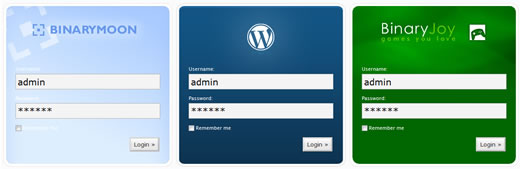
Wordpress Custom Login screen samples

How do you create the images?

This isn’t overly challenging. All you need to do is make a picture that is based on the default template. But wouldn’t it be nice if there was a template file you could base your image on? It would save so much time!

You’ll also need to create a new footer image… but I’ve solved that problem too.

What happens when you upgrade?

One of the things I have tried to do with my Wordpress tips and tricks is stick to things that don’t require changing core files. I don’t like the idea of having to change things every time I upgrade the software, and in this case the images will get overwritten when you install new versions of the software.

The Solution? Ben to the rescue!

Ok, so it’s not the most complicated of problems, or solutions for that matter, but I have an answer to both.

The image template was easy… I made one.

The upgrade issue was a little more challenging, and took me approximately 10 minutes longer to put into action. I give to you, my first Wordpress plugin (and how useful it is), the Binary Moon Custom Login plugin - as seen in action on the Binary Joy login screen.

The plugin itself sits in the plugins folder alongside the images - which you can change as required. The footer image has been changed to a gif with a transparent middle which means you can use any images you like for the main background and they will fit seamlessly.

Because this is a plugin and the images are kept separately from the admin folder upgrades are nice and easy. Just upgrade as normal. This is particularly handy for client sites where they may not be aware of what you have done to customise things.

Let me know what you think.

Comments »

  1. Hi Ben,

    Great work creating a plugin for the change! That’d most certainly help out when updating client sites.

    I’m not sure you’ve worded article right. You mention how I set up a Flickr stream, but I didn’t. Have you done that?

    Thanks very much for the mention, and sorry again to steal your thunder.

  2. 2. Ben
    July 25, 2007

    Hey David - thanks :) I’m now using this on my own sites, that’s really the reason I created it in the first place.

    Thanks for pointing out the flickr thing as well. I set one up (link above) and must have gotten confused when writing the post.

    Don’t worry about stealing my thunder either - I’m a big boy - I can handle it :)

  3. 3. Ayush
    July 25, 2007

    Awsome post Ben,

    Ive been looking to make a plugin for the custom login for a while but never got around to it.

    Ive got re-created wordpress login PSDs on my new blog
    www.dedestruct.com(still under construction). But you can grab them and post them here if youd like for people.

  4. 4. nbeyond
    July 25, 2007

    In fact, I was wondering why no customized login is available when I installed it. You did it. Thanks a lot.

  5. 5. Ben
    July 25, 2007

    Ayush - There is actually a template psd file in with the plugin, although I didn’t recreate the wordpress login screen… maybe I should. BTW I like the design on your new domain :)

    nbeyond - I guess for wordpress themselves it makes sense to not have branding options but for developers this sort of thing is nice to have I think.

  6. 6. Darren
    July 25, 2007

    I’ve styled the login page occasionally, but never considered a plugin solution to protect from future overwrites — great idea.

  7. 7. mary
    July 25, 2007

    Nice idea. I was thinking modifying mine and didn’t know where to begin.

    I just have a question. Is is normal when I want to download I end up on a 404 ?

  8. 8. Ben
    July 25, 2007

    Darren - thanks

    Mary - not normal no. I’m surprised nobody else has mentioned that the download doesn’t actually work :S Thanks for pointing it out - all fixed now.

  9. 9. Chris In Cincinnati
    July 25, 2007

    I just hacked the login screen for a client project and I’m certain that with the next upgrade I’ll overlook the image files in wp-admin.

    Thanks for the fix, one last chance to look like a doofus in front of a client!

  10. 10. Chris
    July 26, 2007

    I thought when I read David’s post yesterday ‘I’ll wait for a plugin’.

    Thanks for endorsing my laziness :twisted:

  11. 11. Ben
    July 26, 2007

    lol Chris - happy to oblige :)

  12. 12. Luke
    July 26, 2007

    You are un genius. We’re using WP as a little CMS at work for a few sites … exactly what we needed :) Thanks

    Also … the TMNT stuff I won just arrived :) Thanks mate

  13. 13. Ben
    July 26, 2007

    Wow - the TMNT stuff turned up - That’s really cool. I’d totally forgotten about that :)

    Glad this helps you as well.

  14. 14. Joe Anderson
    July 28, 2007

    It’s a shame that a certain OpenID plug-in I use messages up my wp-login.php pages - take a look.

    If anyone knows how to fix it btw email me at computerjoe [at] gmail [dot] com :)

  15. 15. Ayush Saran
    July 28, 2007

    @ Joe that sky blue box behind the “Wordpress User” and “OpenID Identity” is coming from

    http://joeanderson.co.uk/blog/...

    h2 {
    >>> border-bottom: .5em solid #e5f3ff;
    color: #333;
    font: normal 32px/5px serif;
    margin: 5px 10px;
    }

    get rid of that border declaration,
    change the text color to something lighter
    and remove the margin to align the text left or force align it center.

    That should clean up your login page

  16. 16. Todd Harrison
    July 28, 2007

    A nice touch. A custom login page ha! I think the best thing to do is to just make it and when you have your clients then just don’t tell them unless they ask. It’s a nice way to customize your wordpress blog. or maybe your just board with the normal login page. in any case I do enjoy it and will use it. Thank you

  17. 17. Alex
    July 30, 2007

    Awesome job. Downloading…

  18. 18. blogtantra.com
    July 31, 2007

    I loved the idea of getting fresh whenever we login.

  19. 19. Ben-Inside
    July 31, 2007

    Thank you so much for this tutorial. Come and watch my custom login page and say what you’re thinking about it.

  20. 20. Jermaine
    July 31, 2007

    Hey, great posting, i never actually wanted to change the login page, but when someone offers a post like this …
    :-) thanks

    btw - appreciate your “dofollow” - i think the same way.

  21. 21. Matt Brett
    August 8, 2007

    Awesome plugin Ben! I’ve done this myself in past, but it was such a pain in the ass having to go back and manually change it after every update.

    Thanks for including a stylesheet as well. I was easily able to add a few more selectors to style the “error” message, labels, input fields and links.

  22. 22. eric johnson
    August 9, 2007

    i’m with matt, i’ve done this in the past but i always dreaded upgrading and forgetting to reload the files or worse, back them up. great job!

  23. Wow, this is a great plugin and I will certainly recommend it to my student. Thank you and good work!

  24. 24. sergio ordoñez
    August 12, 2007

    Hello, I have the plugin installed and it works, but I would like to change the css for the text color.

    How I could change this?

  25. 25. Brad
    August 13, 2007

    I agree with these folks. Great resource. Thanks.

  26. 26. Kerry Webster
    August 14, 2007

    ~sergio~
    http://homteriors.kerrywebster...

    Download my css for this plugin for a few ideas.

    You can see the login page I created with the changes I made to the plugin and the css mentioned above here: http://homteriors.kerrywebster...

  27. 27. Kerry Webster
    August 14, 2007

    By the way, awesome plugin. I took it one step further (if you are trying to mask wordpress from your client). I changed the login image url to the current sites URL and I changed the text to say ‘Powered by ‘ the name of the blog (see code below). This is done without change to the core applicaiton. The following code can be added to the bm-custom-login.php in the plugin folder. Don’t get me wrong here, I LOVE WORDPRESS but if you want to mask this one instance of a link to wordpress.org this is how I did it.


    function change_wp_login_url() {
    echo get_option('siteurl');
    }

    add_filter('login_headerurl', 'change_wp_login_url');

    function change_wp_login_title() {
    echo 'Powered by ' . get_option('blogname');
    }

    add_filter('login_headertitle', 'change_wp_login_title');

  28. 28. sergio ordoñez
    August 14, 2007

    Thanks a lot Kerry :)

  29. 29. pban
    August 14, 2007

    Great job Ben - thanks for the plugin.
    Do you know if it works with Wordpress Mu?
    Cheers

  30. 30. Ben
    August 14, 2007

    Wow - thanks to all the great comments above :)

    Kerry - thanks for doing that - it’s given me some more ideas for the plugin, not sure how worthwhile they would be though.

    pban - no idea, I can’t see why it wouldn’t though, I assume they use the same plugin system.

  31. 31. bfnh
    August 16, 2007

    recently added it to my site as well, and spent _way_ too much time trying to make sure that the bottom curve was as perfect as possible. (rounded rectangle shape w/a 13px radius did the trick)

    i was originally responding to say that i added some css to the included file, but noticed that kerry provided some nice examples in #26.

  32. 32. SEO
    August 17, 2007

    I just set up a new Blog, and funnily enough the very first modification, plug-in, customization etc that came to mind was Ben’s custom WP Log-in.

    Thanks heaps for this Ben, i’ve created a themed log-in for my company and will apply it to all themes and installations i do.

    On a completely unrelated note, your blue Firefox Toolbar button up top reminded me i havn’t reinstalled the Toolbar when i done Firefox… So i had better click it and get installing. :)

    Carly,

  33. 33. Sinklar
    August 19, 2007

    I forgot to customize the login screen and now it is. Well, I didn’t use the plugin, but it’s done. :-D

  34. 34. mnrmn
    August 20, 2007

    am a bit sad. it’s not working with my WP installation – WP 2.0.11 using PHP 4.3.8.

    oh, well…

  35. 35. Paul
    August 21, 2007

    This is a great plugin. Thanks for sharing it.

  36. 36. qba
    August 24, 2007

    Thx :-)

  37. 37. couchmouse
    September 6, 2007

    Thanks Ben for your effort on this plugin. I am using it on my WP 2.2.2. Keep up the good work.

  38. 38. Jay
    September 9, 2007

    Ben,

    Is there a any way to change the background color of the login page? :) (I use black in my blog)

  39. 39. Jay
    September 9, 2007

    Ben,
    Nevermind, I see the css file now! You rock!
    “This is madness!”

    Thanks a lot

  40. 40. sascha/hdrs
    September 13, 2007

    Hi, would it be possible to add an option to this plugin so that it can re-direct to the blog’s index page instead of the admin area after somebody logged in?
    The reason for this is that we run a WP blog as a portfolio and visitors can log in as guests to see all works (because some are hidden to non-guests). But in this situation it is confusing for the guest to be taken to the admin area.

  41. 41. Kerry Webster
    September 16, 2007

    Add the code below to the bm-custom-login.php
    One drawback is every wp_redirect () call will go to your home page. If this is what you want it works quit well.

    [code]
    add_action(’wp_login’, ‘wp_redirect()’);
    function wp_redirect() {
    if ( $is_IIS ) {
    header(”Refresh: 0;url=$location”);
    } else {
    header(”Location: $location”);
    }
    }
    [/code]

  42. 42. Kerry Webster
    September 16, 2007

    Ooops!!! I left the $location assignment out of the first post.

    [code]
    add_action(’wp_login’, ‘wp_redirect()’);
    function wp_redirect() {
    $location = get_option(’siteurl’);
    if ( $is_IIS ) {
    header(”Refresh: 0;url=$location”);
    } else {
    header(”Location: $location”);
    }
    }
    [/code]

  43. 43. sascha/hdrs
    September 17, 2007

    Kerry thanks a lot! I will try that!

  44. 44. sascha/hdrs
    September 17, 2007

    Hmm, WP keeps telling me ‘Plugin could not be activated because it triggered a fatal error.’, even without the altered code in the php file.

  45. 45. sascha/hdrs
    September 17, 2007

    Correction: I caught the wrong file. It only gives me the error with the modified code.

  46. 46. Kerry Webster
    September 18, 2007

    @sascha/hdrs
    The code is working on my site now. If you want you can check my site. Create an account and then login to see the redirect go to the home page rather than the admin page. Be sure and get the code from post 42 (not 41), and make sure the [code] & [/code] are not copied. Let me know if this helps. If not I can e-mail my bm-custom-login.php if you would like to test it.

  47. 47. puttee
    September 20, 2007

    Hi,

    pretty nice plugin…but one question.
    Is there a way also to change the font color of text under the login “form” for
    * Login
    * Lost your password?
    * Back to puttee
    ???

    thanks

  48. 48. Jordan Parker
    November 3, 2007

    Nice one, im going to uses this now :D

  49. 49. ADAC
    November 4, 2007

    Nice tip, we have a few wordpress blogs at my office and we were just talking about how boring our login is.

    Thanks For the tip.

  50. 50. room34
    December 19, 2007

    This is very cool. Exactly what I was looking for.

    A couple of things about the mod to make the login redirect back to the site main page instead of the admin dashboard:

    1) There’s a bug in the add_action line. It should read:

    add_action(’wp_login’, ‘wp_redirect’);

    In other words, remove the () after wp_redirect.

    2) Here’s a fix to the problem of this code ALWAYS making wp_redirect() send you to the home page. Just wrap the wp_redirect() code in a conditional that checks the current script name. Here’s how I’ve implemented the code on my site:

    if ($_SERVER[’SCRIPT_NAME’] == “/wp-login.php”) {
    function wp_redirect() {
    header(”Location: ” . get_option(’siteurl’));
    }
    add_action(’wp_login’, ‘wp_redirect’);
    }

  51. 51. faze one studio
    January 9, 2008

    hello, i have uploaded your plugin but have no clue what it doeas. however if you simply overwrite the two images in you admin folder will do the sam effect….

  52. 52. Ben
    January 9, 2008

    faze one - you’ve missed the whole point of the plugin. Yes, you can just overwrite the images, but when you upgrade the images will be overwritten again. Using the plugin it will always stay the same.

  53. 53. faze one studio
    January 10, 2008

    Ah yes! if you require to re use the stock images…but good plug in none the less…

  54. 54. thomas
    January 15, 2008

    Thanks for this one … working great !!! 1 minute and i have my own login screen :-)

  55. 55. DUI
    February 20, 2008

    This is a heck of an idea! I had honestly never even thought of customizing the wp login page. Brilliant find. Thanks!!

  56. 56. jullian
    February 20, 2008

    hi

    the download link of the plug in is not working , any advice?

  57. 57. Ben
    February 21, 2008

    Hi Julian - thanks for pointing that out - looks like wordpress.org have changed the download locations around. That’s what I get for direct linking to something I can’t control I guess :)

  58. 58. jullian
    February 21, 2008

    it is working now Ben
    thanks :)

  59. 59. Denis
    February 25, 2008

    Hi,

    can you tell me how i can change the background-color (or fill with a background-image) behind the LOGIN?

    Only white is a little boring.

    thanks & cheers
    denis

  60. 60. Tim Kissane
    February 28, 2008

    Ben, great blog and terrific tutorial! I love to see folks share their knowledge.

    @Denis: Try editing the 2nd body tag in wp-admin/wp-admin.css (at line 127 in my file).

    body {
    background: #000000;
    color: #000;
    margin: 0;
    padding: 0;
    }

    I added the background and color parameters.
    An image could be added by specifying the url for the background. You can see my login page by visiting http://timkissane.com and clicking login. ;-)

    Of course, this will have to be added back after an upgrade. Ben, can this be added to the plugin?

    Peace.

  61. 61. Ben
    February 28, 2008

    Tim - I am actually holding off on updating the plugin as Wordpress 2.5 will change everything anyway (what with the admin redesign).

  62. 62. Tony
    March 18, 2008

    Any chance the plugin will be updated for WordPress 2.5?

  63. 63. Ben
    March 18, 2008

    Not sure yet. The whole control panel has changed which will mean this is a bit on the awkward side. Will have to think about how it will work… :S

  64. 64. Jamie Oliver
    March 20, 2008

    Great plugin you have there, it has made it a lot easier skinning the login page. Cheers.
    And also thanks to Kerry for posting that PHP script.

  65. 65. Kerry
    March 22, 2008

    room 34 (comment 50) needs some love for his update as well. Much cleaner redirect based on current page.

  66. 66. William
    March 25, 2008

    hey ben,

    I’m using wordpress 2.5, and this does not work. I love this plugin, and want you to update it. If you do, can you email me?

  67. 67. Ben
    March 25, 2008

    William, and anyone else interested in a 2.5 version. I currently have no idea how the 2.5 version would work. The styles in 2.5 are totally different and currently no background image is used at all. It must be possible but it will be very different to what I had before, I need to think on this.

  68. 68. Kerry
    March 31, 2008

    BRANDED LOGIN SCREEN
    WordPress 2.5 compatibility.

    http://www.kerrywebster.com/?p...

  69. 69. Jonathan Blundell
    March 31, 2008

    looks like the login busts with Wordpress 2.5 I haven’t had time to play around with it yet, but if you come up with a solution I’d love to know

  70. 70. Ben
    April 1, 2008

    Kerry - Thanks :)

    Jonathon - There’s actually a new version released that works with WP 2.5 - I just haven’t written about it yet.

  71. 71. Jacob Cass
    April 3, 2008

    For Wordpress 2.5 I wrote about how to do this manually by editing the CSS over at my blog here:

    http://justcreativedesign.com/...

    I also linked back to here :)

  72. 72. mac
    April 7, 2008

    great job guy ,
    can you please tell me how i can resize the frame. lets say 390 x 900. how would i modify that input. ..

  73. 73. Ben
    April 7, 2008

    Mac - I am not sure what you want to do. Could you try to explain a bit more completely?

  74. 74. Blue
    April 12, 2008

    just built my login using your plugin and tips. thanks!

  75. 75. Lionel Chollet
    May 3, 2008

    Hello,

    thanks for this plugin!

    If your WordPress install is located in a subdirectory at your domain (e.g. yourdomain.tld/yourwordpress) but your blog address is at just “yourdomain.tld”, you may want to modify line #41 in bm-custom-login.php, from:
    ` echo get_option( ’siteurl’ );`
    to:
    ` echo bloginfo(’url’);`

    If you don’t modify this line, clicking on your logo on your custom login page might trigger an error 404 (page not found).

  76. 76. Michael
    May 15, 2008

    Hi!
    I use your plugin for a customized login at my page. In Firefox it works well, but in Internet Explorer 7 there´s no footer in the login form. Any ideas how to fix it?

  77. 77. Ben
    May 16, 2008

    Lionel - thanks for letting me know. I will modify the plugin accordingly :)

    Michael - I didn’t realise there were issues with IE (I’m not surprised though :S ), I will take a look.

  78. 78. Marc
    May 18, 2008

    Yes Ben, Unfortunately I just upgraded Wordpress to version 2.5.1 and now my log-in screen using BM Custom Log-in in IE is now wack.

    It works fine in Opera, Firefox and Netscape, but the login-bkg-bottom.gif doesn’t align properly anymore in IE. You can take a look at my web site at 117reunion.com to see the problem if you like.

    I am wondering if it is a possible code change that needs to be made to the wp-login.php file?

    Thanks!

  79. 79. Kim
    May 20, 2008

    Hi Ben -
    I installed your plugin last night, and I am having the same issues with the background at the bottom that the last couple of posters are. It looked great in FF, Opera, etc., but it was shifted over in IE6.
    I played around with it a bit, and finally fixed it in IE6, but the changes broke the layout in the rest of the browsers, so I had to undo them.
    Have you had a chance to look into what is causing the shift in the footer area?
    Other than that issue, I really love being able to customize my login screen. Thanks!

  80. 80. Ben
    May 20, 2008

    Hi Kim - I haven’t had a chance to look at it yet but it’s on my todo list. Hopefully I will get it working tomorrow. If you use wordpress 2.5 then you can use the automatic plugin update notifications to find out when I update the thing.

  81. 81. Brent
    May 21, 2008

    We love the plugin but it now breaks in 2.5.1, ecoflock 1.1.4. Seems similar to comments #78, #79.
    again, we LOVE the plugin!
    aloha

  82. 82. Ben
    May 22, 2008

    I’ve updated the plugin with support for wordpress 2.5.1 and a fix for Internet Explorer. Let me know if there’s any other problems.

    Brent - I have no idea what ecoflock is?

  83. 83. arni
    May 22, 2008

    will it work for WP 1.5? and how?

  84. 84. Ben
    May 22, 2008

    1.5? I doubt it but if it does you should just upload as you would a regular theme.

    You really should upgrade though, the extra features and security fixes are more than worth the effort. FWIW I don’t support anything less than 2.3

  85. 85. Michael
    May 22, 2008

    Thanks for the update! Now it´s working fine in IE.

  86. 86. Marc
    May 22, 2008

    Brilliant job Ben. The upgrade was seamless except for it removing my own personal log-in image and replacing it wit the default one. Good thing I save a copy of it on my computer. Maybe in the future on automatic upgrades done through the Word Press you should have it so that it doesn’t remove the user’s own images.

  87. 87. Marc
    May 22, 2008

    Actually i just realized there is a small sliver missing now from the top of the log-in button in IE, but it is not an issue.

  88. 88. Justin
    May 23, 2008

    ^^ I agree with Marc. I’m glad I read that post before automatically upgrading or I would have been a bit irritated. ;-)

  89. 89. Ben
    May 23, 2008

    This is an interesting conundrum, I am not sure what to do here. The problem is that the files I update will be downloaded by people when they first install the plugin, so they need something to show… maybe I should just rename the files and hope they realise what is happening.

  90. 90. Marc
    May 23, 2008

    To me the simple solution would seem to be that you create two sets of the plug-in for download.

    The first one is available for download to new users and the second one is an upgrade version for either automatic or manual upgrade which does not replace the login-bkg-tile.jpg file in the imgs directory.

    Two download links. Seems easy enough, but I don’t know.

  91. 91. Tony Gray
    May 23, 2008

    I keep my custom images in another folder and just update the path in the css after upgrades. Maybe you can store that path in the Database and on a new install it will have the default images path, then once someone customizes they change the path. The upgrade should not overwrite the path in the database. You would have to create an admin screen to set the path and also some instruction on the page directing people to put custom images in the themes image folder. Maybe too much trouble…just some simple user training may be the answer.

  92. 92. hellows
    May 26, 2008

    Wrong instructions. ”Create two images (login-bkg-tile.gif and login-bkg-bottom.gif) and then stick them in the wp-admin/images/” This does not work. you have to place the images in the plugins image folder. However this does not delete the WP LOGO. The logo is still on top of the custom image. Where do I delete the WP LOGO ?

  93. 93. Jinsoo An
    May 27, 2008

    The redirect after login does not work for me!

    I have the following code in bm-custom-login.php:

    add_action(’login_head’, ‘bm_custom_login’);
    add_filter(’login_headerurl’, ‘change_wp_login_url’);
    add_filter(’login_headertitle’, ‘change_wp_login_title’);

    if ($_SERVER[’SCRIPT_NAME’] == “/wp-login.php”) {
    function wp_redirect() {
    header(”Location: ” . get_option(’url’));
    }
    add_action(’wp_login’, ‘wp_redirect’);
    }

    Anything I did wrong here?

  94. 94. Mike Ritter
    May 29, 2008

    Image template and non- PhotoShoppers
    Amazingly useful template, but the ‘.psd’ image template file excludes those without these programs. I noted that the image was 390 px by 700 px with 10 px rounded margins. I recreated this and loaded the ‘.jpg’ to my file and it worked great (except the hint of misaligned rounded border at bottom).
    NOTE: I look forward to universal adoption of CSS rounded corners — that will make all our lives much easier.

  95. 95. Ben
    May 29, 2008

    Hellows - oops. I will fix that soon

    Jinsoo - I will see if I can add something like this to the plugin by default also hopefully it will work in the future.

    Mike - I realise the psd template excludes people without photoshop but like you say, it’s not hard to make your own. I am afraid I’m not going to start making new templates for other software but if you want to contribute one I’d be happy to include it and credit you.

    And yes - consistent rounded corners in all browsers would be great :)

  96. 96. Matthew Patulski
    May 29, 2008

    Love the plugin, have it running on our site - wp 2.5.1 - too easy to set up. It does however dissemble and overlay the top part of the new graphic with the original Wordpress logo when I use with wp-security-scan.

    Will pass this along to other developer as well.

  97. 97. Chad
    May 30, 2008

    the issue with this plugin and security scan is because of line 24-36 version check.. if you are running full version of WP short is fix
    replace
    [code]
    // check which version of wp is being used
    $blog_version = $blog_version = substr(get_bloginfo(’version’), 0, 3);
    // split style sheets based upon current wp version
    If ($blog_version >= $versionCheck) {
    $pluginUrl .= ‘/bm-custom-login-2.css’;
    }else {
    $pluginUrl .= ‘/bm-custom-login.css’;
    }
    [/code]

    with
    [code]
    $pluginUrl .= ‘/bm-custom-login-2.css’;
    [/code]

  98. 98. Ryan McLaughlin
    June 5, 2008

    I made some changes to your plugin that allow for a javascript file to be included in addition to the CSS file. I was able to do a lot more customizing with this.
    you can see it here. http://wordpress.justechn.com/...

    // full plugin path
    $pluginUrl = get_settings(’siteurl’) . $pluginPath . plugin_basename(dirname(__FILE__));
    $scriptUrl = $pluginUrl;
    // check which version of wp is being used
    $blog_version = $blog_version = substr(get_bloginfo(’version’), 0, 3);
    // split style sheets based upon current wp version
    If ($blog_version >= $versionCheck) {
    $pluginUrl .= ‘/bm-custom-login-2.css’;
    $scriptUrl .= ‘/bm-custom-login-2.js’;
    }else {
    $pluginUrl .= ‘/bm-custom-login.css’;
    $scriptUrl .= ‘/bm-custom-login.js’;
    }

  99. 99. jo
    June 14, 2008

    Can anyone tell me how to change the input box color, i mean like username box , pass box, etc..
    Thanks

  100. 100. Arnav
    June 19, 2008

    I can’t use it. Upload the gifs in the right place but nothing shows up. M running wp 2.5

  101. 101. Richard
    June 19, 2008

    Thanks for this nice plugin. It allows a bit of professionalism to the login screen.

  102. 102. Venesa
    June 30, 2008

    Hi
    1. How do you change the button colour on the screen. I changed your 2 screen files colour to purple yet the button is still wordpress blue. So is there a button template to change.
    2. How do you change the button itself. The button you showed on all the examples is not the WP2.5.1 button that appears on my login form. It is the same button I had before.
    Hope you can help. Thanks so much.

  103. 103. nathan
    July 1, 2008

    Thanks for the plugin, very useful.

    You’ve also got a really nice site design.

  104. 104. Dave
    July 6, 2008

    Same here with the latsest version of WP…they don’t use the gif’s anymore that are in that folder. You can change manually by changing the css file in the admin/css/logincss folder

  105. 105. Ben
    July 7, 2008

    @Dave - the latest version works with Wordpress 2.5

  106. 106. Emily
    July 9, 2008

    Hey Ben,
    Love the idea, but can’t seem to get it to work with WP 2.5. Do you know of any plugin conflicts? In other words, I have, say, Register Plus, which allows me to change the header image, but not alter the design in other ways (though if I disable this plugin, I still have the same issues). It seems like this version of WP has an entirely different login screen than prior versions which feature the rounded-corner look. Therefore, this BM plugin doesn’t seem to fit in the allotted space. Anyone else finding this to be a problem? @Ben: ideas?

  107. 107. Venesa
    July 14, 2008

    I am still curious about the button. Why is there no button in your plugin. As I mentioned on 3 July - the button is the default blue button from worpress 2.5.1. Kerry Webster says I need to use a button from another plugin (branded) called fade-button.png. I’m not sure why and not really sure how to use it in your plugin. Hope you can help. Thanks.

  108. 108. Ben
    July 15, 2008

    Vanesa - I have no idea about the problem you’re seeing. There should be a button. The only suggestion I have is to make sure you’re using the latest version of the plugin and that no other plugins conflict with it (I would try disabling them one at a time until it shows)

  109. 109. Ben
    July 15, 2008

    Emily - I am no aware of any conflicts. The plugin is very simple. That said it wouldn’t surprise me if something went wrong somewhere.

  110. 110. Venesa
    July 16, 2008

    Hi Ben, Yes there is a button the default wordpress 2.5.1 button not a button from your files. I have the latest version of your plugin bm-custom-login version 1.3. There is no button file in our files. I have deactivated my plugin. I downloaded your plugin again and installed it. Again there is no button from your plugin just the blue default button from wp 2.5.1. Maybe you could email me the button file as there definitely is not one in the plugin. Thanks so much.

  111. 111. Barbara
    July 21, 2008

    Hi, the plugin works really great!!
    However I also have a sidebar login widget installed and the white text was not showing on the front page with white background (it was fine on the login page because my background was orange). So I guess the sidebar widget was using the same css file, so how can I differentiate that?

  112. 112. Ben
    July 22, 2008

    Venesa - do you have a page I can look at to see the problem? There is no button file in the plugin - I don’t change the style of the buttons so you will use the default wordpress button style (this changed between wp2.3 and wp2.5)

    Barbara - that’s another strange problem. I would never even have considered using the login box as a widget - and if I did I wouldn’t use the css from the login page. Do you have a url I can have a look at?

  113. 113. Barbara
    July 22, 2008

    Hi Ben, thanks for the quick reply, please check my construction site www.jingyung.com it’s in Chinese. The login widget I added was called Minimeta plugin I downloaded from wordpress. Before I used your plugin the text was normal i.e. black but after your plugin the text becomes white which works OK if i inserted an orange background gif but wouldn’t if i just use a white background. I guess this widget somehow shares the CSS from your plugin so the text is white. I want my text on login page white but not on this login sidebar…

  114. 114. ITCN Web Design
    August 19, 2008

    Great job! I had a client that wanted to allow users to login, but needed to integrate the login page with the site design. This is exactly what we were looking for.

  115. 115. Ian Blackford
    August 20, 2008

    I’ve been looking for this very thing! Found it at last!

  116. 116. Mauricio
    August 26, 2008

    I have a Big trouble….

    I use register plus plugin (http://skullbit.com/wordpress-plugin/register-plus/) but when BM CUstom Login is enabled no “validation emails” are sent to new users… with BM Cus loguien is off everythings go by mail Fine..

    How Can I solve this?

  117. 117. Venesa
    August 27, 2008

    Hi Ben

    Is BM Custom Login suitable for Wordpress 2.6.1. If not when will it be available. I am currently using it on WP 2.5.1 but don’t want to fall behind in the WP upgrades.

    The button to sign on is still WP blue. Do I change this in Wordpress - color-fresh.css?

  118. 118. Roland
    August 27, 2008

    Hi Ben,
    I think I’m having the same problem that Venesa was having. Did you ever figure out what the problem was and what the solution is? Thanks.

  119. 119. Ben
    August 27, 2008

    Mauricio - I would suggest not using the custom login plugin if it’s breaking something else. I have no idea what the issue could be but bm-custom-login doesn’t touch any of the emailing functionality. All it does is add a couple of style sheets to the administration page.

    Everyone else - in my tests the plugin works fine with wordpress 2.6, I don’t know what problem you are talking about it looks as intended. If you mean customising the login button colour then that should go in one of the css files in the plugin. The whole point of the plugin is that you don’t edit core wordpress files (such as css-fresh.css) as these get overwritten when Wordpress is updated.

  120. 120. Mauricio
    August 28, 2008

    Maybe you are right.. Maybe the guilty would be phpmail or what is wordpress using for sending validation mails.

    Thank you, I´m still looking for help :P

  121. 121. Venesa
    August 28, 2008

    Hi Ben
    I noticed your latest coment #119 says not to change the wp css files. Can you have a look at my login screen at http://catchronicles.net which is now online. I just don’t know how to change it unless I change the wp css file. Roland says he may be having the same problem. Is anyone else?

    Also I am not sure what this means in your DoFollow if I add the website - “will now get some link juice from Google when you comment and supply your site url”.

    Thanks so much for your help.

  122. 122. Ben
    August 29, 2008

    Mauricio - post again if you work out what the solution is. I can’t see how it could be my plugin but if it is then I’d like to get it fixed.

    Venesa - if you want to customise the button then I would suggest changing one of the plugins css (wp-content/plugins/bm-custom-login/bm-custom-login-2.css) files instead of the wordpress fresh css file.

  123. 123. Mauricio
    August 29, 2008

    Yes, I THink that the plug in has not anything to do with my problem. I think that the problem is related to the function of the going out mails of phpmail(). Now I´m using SMTP plugin for wordpress to see if this helps.

  124. 124. Stockpreacher
    September 1, 2008

    Thanks ben! It helps me alot. I am making a memebership site to provide people our stock market tips and free stock pick. I am trying to looking at a custom look login page awhile. Fortunlatey, I find your plugin. Once again thank Ben!

  125. 125. Ruiz
    September 6, 2008

    sir, you are THE MAN! I am so thankful for this plugin!

  126. 126. hs
    September 10, 2008

    Hi,
    May I know what happens after you login? Do we still see the default wordpress dashboard? Can we customize that?

  127. 127. Ben
    September 10, 2008

    hs - it’s only for the login screen. Everything else remains the same I’m afraid.

  128. 128. hs
    September 10, 2008

    I see. Thanks, Ben! :)

  129. 129. Rasheed
    October 6, 2008

    Great tip !
    Like it ..
    Thanks ..

  130. 130. Indiawilds
    October 13, 2008

    I am using the wordpress 2.6.2 version. i was using the custome login before and it was working file.now when i upgraded the wordpress logo still appears inspite of the background image which i have uploaded.
    please let me know what to do.
    thanks.

  131. 131. Ezzerique
    October 18, 2008

    i’m facing a big problem here..after installing this plugin i cant even login to my blog..evrytimes i login it will redirect me to the login page..plzz help me..plzzzz

  132. 132. Ben
    October 19, 2008

    If you’re having problems with the plugin then just login to your ftp and delete the files, but I really doubt the issue is this plugin as it doesn’t affect anything like that.

  133. 133. Neti
    October 21, 2008

    Hey Ben, thanks for the plugin. I changed some of the CSS as the text was getting broken and lost padding with german language settings. It should look exactly the same but work with a longer “Lost your password?” string.
    #nav {
    background:url( images/login-bkg-bottom.png ) no-repeat bottom left;
    width:380px;
    height:45px;
    margin:0 0 0 -5px;
    padding:0 0 0 28px;
    }
    I removed the text-indent and did the job with margin and padding.
    cheers

  134. 134. Jason
    October 23, 2008

    For the life of me I cannot get this to work on WordPress MU. There are post that I’ve found where people say “modify a core file to make it default for all blogs, etc” but they never say what core file. As for “change the php file to point to the mu plugin DIR” … that’s already there.

    I am so confused!

  135. 135. Justin Flood
    October 28, 2008

    I’m having a problem with this plugin on Wordpress 2.6.2. Whenever I have the plugin installed, my custom login screen is broken and the wordpress logo is still displayed. It used to work great, but not anymore. What happened??

    check out an example image of this problem here:
    http://www.justinflood.com/pic...

  136. 136. Gustavo Cassab
    October 29, 2008

    Me too.

    After upgrade to 2.6.3, i have problem with login css.

    U can see it into http://www.portogaspar.com/wp-...

  137. 137. Rich Spott
    October 29, 2008

    To Jason:

    Place the Plugin in the plugins folder, not mu-plugins. Then get Plugin Commander and set the Custom Login plugin to auto-enable, and then hide the Custom Login plugin from the blog owners, all are settings in Plugin Commander. Don’t edit core files unless you have to, but you shouldn’t for this.

    To Justin Flood:

    Unfortunately, it seems that when you update to Wordpress 2.6.2 or higher, the Custom Login Plugin, loses it’s CSS priority, or maybe can’t find it. The CSS file from the updated Wordpress you installed takes over, but the plugin still tries to force the image in there, that is why the Wordpress logo is in there, with your login image and the padding is all screwed up. It might have something to do with hooks missing in the newer Wordpress. Hopefully an update will come.

  138. 138. Ben
    October 30, 2008

    Thanks for the tips Rich

    It looks like i will have to look into the issue with WP 2.6 not liking the css files being included. I shall update everything as soon as I can

  139. 139. Jash Sayani
    November 11, 2008

    There is a formatting problem with mine… Is there a way to shift the login fields a bit down..?

    Thanks.

  140. 140. Bastian
    November 13, 2008

    What do you think, when will a new version be released?

  141. People who link to this post...

Leave a message tell me what you're thinking

Please feel free to comment - I like receiving them - however I would appreciate you using your real name. I am not here to improve your search engine ranking. Abusive/ Inappropriate posts and advertisements will be deleted.

Binary Moon
