Using TimThumb Part 3: Image Filters

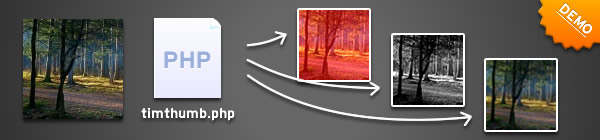
So far I have documented the basic TimThumb functionality, and how to resize images that are on external domains and now things can get interesting. In this part I will talk about some of the features that have been available for a while, but never officially documented - Image Filters.

Image Filters

When I talk about image filters I mean the types of effects you can get in Photoshop or most other image editors. Things like altering brightness and contrast, and blur or emboss. All this functionality is included in TimThumb.

The functionality is actually the implementation of a single PHP function called imagefilter. For more details you can check out the imagefilter documentation on php.net.

f - image filters

The filters are controlled through the 'f' query variable. You give the parameter a series of characters and it converts them into different effects.

Since some filters require arguments such as colour values or strength of the filter (amount of contrast for example) you need to pass the filter id followed by the arguments in a comma separated list. For example the brightness filter (id 3) requires 1 argument - so to give a brightness strength of 10 it would look like this:

f=1,10

It's probably easier to understand if you see it in practice so now would be a good time to view the demos.

The image filters and arguments that you can use are:

  • 1 = Negate - Invert colours
  • 2 = Grayscale - turn the image into shades of grey
  • 3 = Brightness - Adjust brightness of image. Requires 1 argument to specify the amount of brightness to add. Values can be negative to make the image darker.
  • 4 = Contrast - Adjust contrast of image. Requires 1 argument to specify the amount of contrast to apply. Values greater than 0 will reduce the contrast and less than 0 will increase the contrast.
  • 5 = Colorize/ Tint - Apply a colour wash to the image. Requires the most parameters of all filters. The arguments are RGBA
  • 6 = Edge Detect - Detect the edges on an image
  • 7 = Emboss - Emboss the image (give it a kind of depth), can look nice when combined with the colorize filter above.
  • 8 = Gaussian Blur - blur the image, unfortunately you can't specify the amount, but you can apply the same filter multiple times (as shown in the demos)
  • 9 = Selective Blur - a different type of blur. Not sure what the difference is, but this blur is less strong than the Gaussian blur.
  • 10 = Mean Removal - Uses mean removal to create a "sketchy" effect.
  • 11 = Smooth - Makes the image smoother.

Multiple Filters at once

To make this super flexible I thought it would be good if I could chain the filters together to use multiple filters on a single image. To do this simply separate multiple filters using a pipe character and then pass the whole lot to TimThumb. For example the values below would apply a brightness of 10 to a grayscale image:

f=2|1,10

You can see some examples of multiple filters being used on the demo page.

s - sharpen

One little extra I recently added is a sharpen filter. This is separate to the other filters above as it doesn't use the imagefilter PHP command. All you have to do is add an s=1 value to the TimThumb query string.

Coming Up

I think that this is a really cool feature, it opens up loads of potential for creative use in image galleries and blogs. In fact if you are an Elemental WordPress theme user, then you already have the ability to use grayscale images on your websites using the theme control panel. However next week there will be more. I will be publishing code for moving the crop position around - which is the single most requested feature there has been.

Share This...

TimThumb Technical Support

Need help with getting TimThumb to work? Check here for my prices.

Support ›
About The Author

Ben Gillbanks

Web Designer, Video Gamer, Blogger, and part time Entrepreneur. Read More

28 thoughts on “Using TimThumb Part 3: Image Filters

  • Reply ›
    The Frosty

    That's awesome, thanks for sharing. Looking forward to the next one..

    August 20, 2010

  • Reply ›
    Jean-Baptiste Jung

    Killer resource! Thanks Ben :)

    August 20, 2010

  • Reply ›
    matias

    Hey, nice work! i really appreciate but cant download the script from google code...
    Thanks a lot :)

    August 20, 2010

  • Reply ›
    matias

    thanks a lot, Ben! i'm testing it now :)

    August 20, 2010

  • Reply ›
    Devesh

    Super Awesome Resource Ben. Really Great Job.

    August 22, 2010

  • Reply ›
    Elliott the web design guy

    Wow, I've been using this script for ages and I never knew this!

    August 24, 2010

  • Reply ›
    Harzem Aras

    Wow! Great script. Thanks for description!

    August 25, 2010

  • Reply ›
    Drew

    Ben,

    Looking forward to being able to crop the thumbnails from the top center! Hoping to read about it soon. I modified timthumb using some code I found on studio-xl.com, but it made the image go all black... in fact, I wanted to use the f=2 option to turn my thumbnails to grayscale, but that also results in a black image. Any clues on how to fix that one?

    Thanks!

    August 28, 2010

  • Reply ›
    Rafal

    The IMG_FILTER_COLORIZE doesn't accept the alpha variable. A bug?

    September 23, 2010

  • Reply ›
    Akshay

    hey .. first of all .. its brilliant .. and secondly what about water mark is that possible .. or will it be ..

    October 16, 2010

  • Reply ›
    Ted Thompson

    Excellent bit of coding, use it on several sites. Keep up the good work! Thanks Ted.

    March 22, 2011

  • Reply ›
    Holly

    Thank you so much for this wonderful script! It works great and I'm having such fun with it. Just one feature request: please, oh please, could you provide a more gentle sharpening option (e.g. s=2), or the ability to add strength arguments to the sharpening filter? The sharpening filter is extremely useful but the default is too strong for my images. I would be eternally grateful!

    July 23, 2011

  • Reply ›
    James R

    Hi,

    Great script. One tiny issue, however. The value of the `a` parameter in the ´rgba´of the colorize function does not have any effect...

    Regards,

    James

    September 8, 2011

    • Reply ›
      Ben

      Hey there - thanks for the report. If you could post bugs on the Google code site then I will have a record of them and be more likely to remember to sort them out :)

      September 8, 2011

  • Reply ›
    James R

    Hi,

    I've been stupid ... the value of the `a` parameter in the ´rgba´of the colorize function does have effect... on png images (I was using jpg).

    Sorry.

    September 8, 2011

  • Reply ›
    Alexandra

    Hi Ben, I've tried to edit the zc in my slider.php file, but nothing changes.

    <img class="nivim" src="/timthumb.php?src=&h=300&w=960&zc=2" alt="" title=""/>

    am I doing something wrong?

    January 5, 2012

  • Reply ›
    DARKF3D3

    Hi Ben, do you know if it is possible to add/remove effect only hen mouse hover? ...like in css attribute ":hover"

    January 15, 2012

    • Reply ›
      Ben

      Hi - I think the easiest way to get this to work would be to use some jQuery and css. If you used CSS alone then you'd have to write the styles with your cms, which gets a bit messy.

      January 16, 2012

  • Reply ›
    Athar

    Hi Ben,

    I am applying filter option it is automatically reside it. why please help

    filter image:

    http://heatwavesupply.com/...umbs/thumb6.jpg&f=3,60

    Actual image:

    http://heatwavesupply.com/...er/images/thumbs/thumb6.jpg

    July 17, 2012

  • Reply ›
    Athar

    Ben,

    Thanks Ben I made it.

    July 17, 2012

  • Reply ›
    keesha

    Hi,

    I've got timthumb.php inside my WordPress template-folder and it processes all the thumbnails fine, just right out of the box.

    After that i tried to figure out how to apply the "greyscale filters to/on my thumbnails" so i ended up here after 2 hours of googling and at least a minimum of 4 cups of coffee :D .

    I am not a coder nor a programmer but i hope you can give me some directions to get this greyscale filter work.

    Thank you in advance :D

    keesh

    August 10, 2012

  • Reply ›
    tavax

    Hi Ben,

    I have a problem:

    I want to combine the greyscale and the colorize, but when I add colorize, my picture wins so much brightness, So I think, I will add negative brightness for egalize but no, I loose the contrast, so I added contrast to overcome the problem but it's impossible, the result is very bad matter the combinations.

    That's an issue? Why colorize add so much brightness? Why the alpha change nothing?

    Just for you give the idea, use this: f=5,158,177,181,0

    Thanks for your return

    September 26, 2012

Leave a Reply

Your email address will not be published. Required fields are marked *

You may use these HTML tags and attributes: <a href="" title="" rel=""> <abbr title=""> <acronym title=""> <b> <blockquote cite=""> <cite> <code> <del datetime=""> <em> <i> <q cite=""> <strike> <strong>

Websites linking here

  1. Favicon for http://www.google.com/s2/favicons?domain=www.binarymoon.co.uk Complete TimThumb Parameters Guide

My Projects

TimThumb - Image Resize Script TimThumb

Image Resize Thumbnail Script

WPVote - WordPress Social Voting WPVote.com

WordPress Social Voting Site

About me

About BenMy name is Ben Gillbanks. I'm a lover of Video Games, WordPress, Web Development and everything in between.

I have been working on the internet since 1998, and working with computers even longer. I am a hardcore Nintendo fanboy and have owned most of their consoles at one stage or another.

Read more about me on my about page.

Random Link-outs

Keep Updated

Subscribe to RSS

Stay Updated

Binary Moon

WordPress and Web Development › home of Ben Gillbanks