Redesigning the WordPress admin Redesign
June 19, 2008 | Web Design
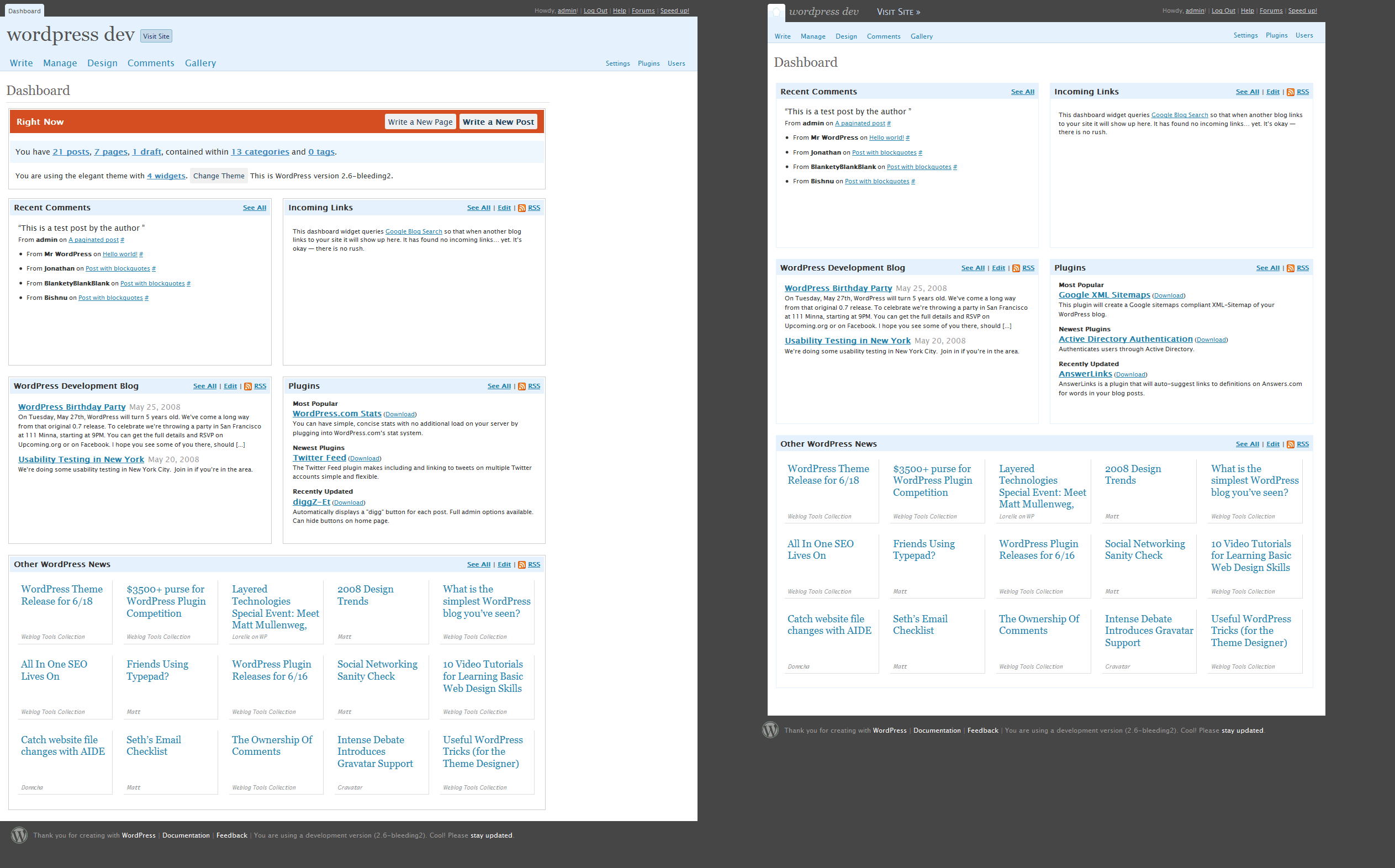
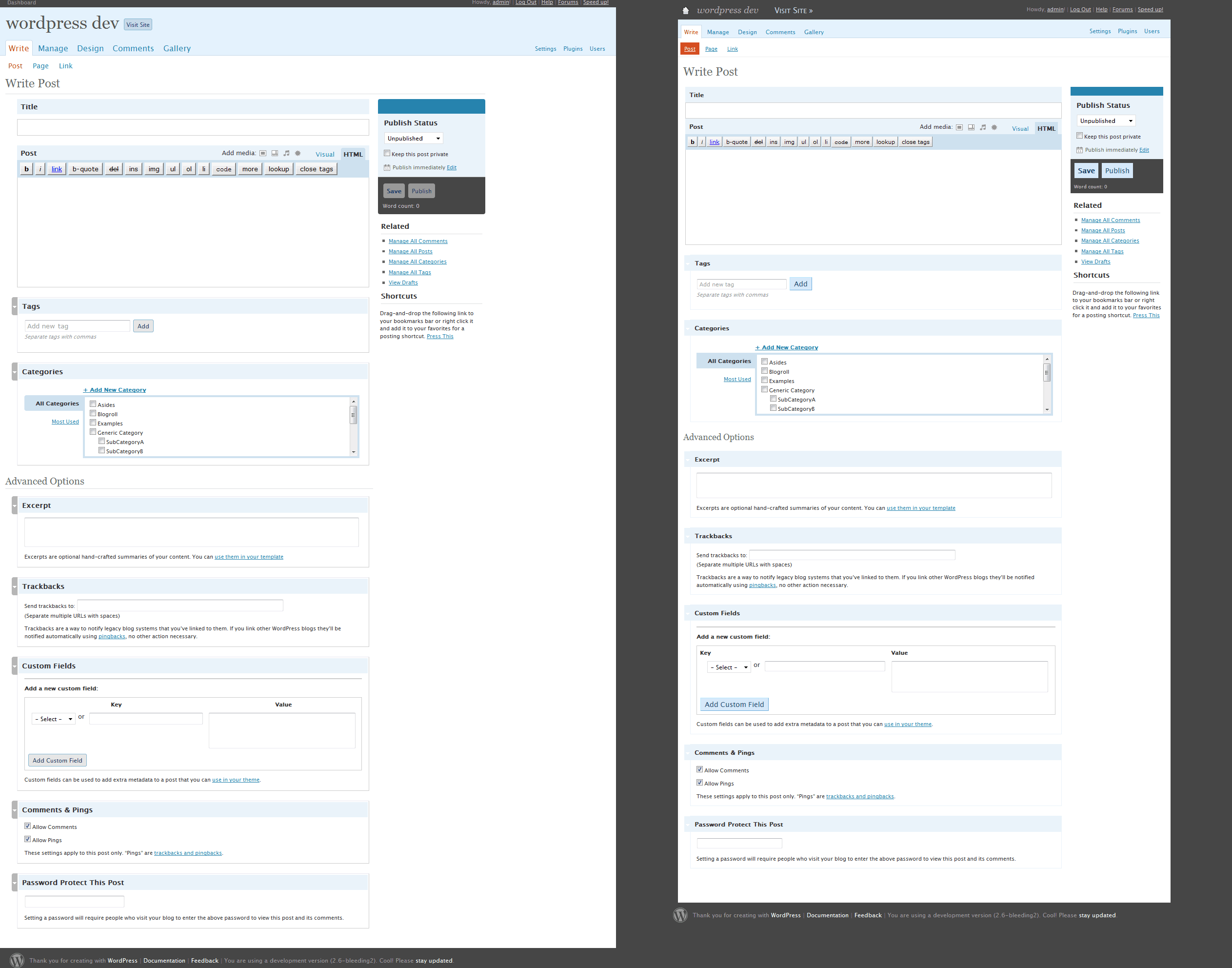
Ever since the first betas of WordPress 2.5 I have been making my own version of the admin panel. I like a lot of what they have done but there were some very basic things missing in the design, and I could see a number of ways to improve it. Every now and then I will add something new to tweak it a little bit more and then last week Eric Meyer released his own version of the admin redesign which gave me a few more ideas for improvements.
Making the changes is easy, it’s simply a wordpress plugin. I also don’t touch (many) colours so any future changes to the Wordpress core should go unaffected.
I’m not sure if this is something people would want to use or not so I thought I’d post some screenshots of what I have done so that I can get some feedback.
The dashboard (click for full size version)
The Write post page (click for full size version)
Features
Some of the key features include…
- A more compact header
- A centered fixed width layout
- A clearer navigation structure, in particular in the sub menu
- no rounded corners (they look crap in everything but Safari anyway)
- … other minor things that are too small to mention
I’d really like to know what people like/ dislike about the design, and about Wordpress design in general. Maybe I can improve it even more, and if there’s enough interest I will consider turning it into an official plugin too.


Comments »
June 19, 2008
Yes please - release a plugin. Looks good.
June 20, 2008
Hey, I definitely actually dig that orange header thingummy on the dashboard (love seeing how many posts & such I have), but otherwise, very nice! Definitely eagerly awaiting a release of this so I can give it a whirl.
June 20, 2008
Kevin - cool, thanks
Jeff - I did wonder if people would want that or not. Maybe I could add an admin screen so that people can toggle the bits that might be more controversial.
June 20, 2008
@Ben - That’d be excellent!
June 22, 2008
Hey Ben -
I am currently using your theme with a couple of changes (I am on WordPress.com so I didn’t touch the CSS or anything like that). If you check my blog (http://hummingbird604.com) you’ll notice that people seem to want more contrast between the background color and the text. How can I change that within WordPress.com? Or is there anything I can do?
Thanks!
Raul
June 22, 2008
Hi Raul - the only way to change the text colours is to buy the wordpress.com css upgrade and then alter the font properties.
June 26, 2008
I’m going to turn this into an official plugin. I have applied to Wordpress.org for space in the plugin library and will release it once they hand it over.
June 27, 2008
Awesome!
July 2, 2008
I use both the mistylook and regulus themes on WordPress and have trouble getting the more tag [] to work.
I want to use it for both posts and comments.
I particularly wish to shorten some of the comments on my blog
My blogs are at http://bushtelegraph.wordpress... and http://wpos.wordpress.com/
October 7, 2008
Thanks for this plugin, I like it a lot. The only problem is that it messes up the formatting of the “Press This” pop up window. Any chance this getting fixed in the next update?
Thanks!!
October 8, 2008
Hi Brad - glad you like it. I don’t think I will be updating the plugin for some time since the next version of Wordpress is going to have a totally new interface (read more here… it’s been updated since then as well). I suspect I will end up making more tweaks but I will wait until the new redesign is completed.
October 8, 2008
Hey that’s great to know Ben, thanks for the good info on Crazyhorse… I guess I’ve been out of the loop on WP dev. No pun intended