More information →
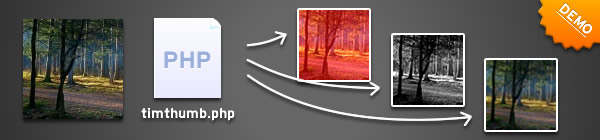
So far I have documented the basic TimThumb functionality, and how to resize images that are on external domains and now things can get interesting. In this part I will talk about some of the features that have been available for a while, but never officially documented – Image Filters.
 ]
]
Image Filters
When I talk about image filters I mean the types of effects you can get in Photoshop or most other image editors. Things like altering brightness and contrast, and blur or emboss. All this functionality is included in TimThumb.
The functionality is actually the implementation of a single PHP function called imagefilter. For more details you can check out the imagefilter documentation on php.net.
f – image filters
The filters are controlled through the ‘f‘ query variable. You give the parameter a series of characters and it converts them into different effects.
Since some filters require arguments such as colour values or strength of the filter (amount of contrast for example) you need to pass the filter id followed by the arguments in a comma separated list. For example the brightness filter (id 3) requires 1 argument – so to give a brightness strength of 10 it would look like this:
f=1,10
It’s probably easier to understand if you see it in practice so now would be a good time to view the demo.
The image filters and arguments that you can use are:
- 1 = Negate – Invert colours
- 2 = Grayscale – turn the image into shades of grey
- 3 = Brightness – Adjust brightness of image. Requires 1 argument to specify the amount of brightness to add. Values can be negative to make the image darker.
- 4 = Contrast – Adjust contrast of image. Requires 1 argument to specify the amount of contrast to apply. Values greater than 0 will reduce the contrast and less than 0 will increase the contrast.
- 5 = Colorize/ Tint – Apply a colour wash to the image. Requires the most parameters of all filters. The arguments are RGBA
- 6 = Edge Detect – Detect the edges on an image
- 7 = Emboss – Emboss the image (give it a kind of depth), can look nice when combined with the colorize filter above.
- 8 = Gaussian Blur – blur the image, unfortunately you can’t specify the amount, but you can apply the same filter multiple times (as shown in the demos)
- 9 = Selective Blur – a different type of blur. Not sure what the difference is, but this blur is less strong than the Gaussian blur.
- 10 = Mean Removal – Uses mean removal to create a “sketchy” effect.
- 11 = Smooth – Makes the image smoother.
Multiple Filters at once
To make this super flexible I thought it would be good if I could chain the filters together to use multiple filters on a single image. To do this simply separate multiple filters using a pipe character and then pass the whole lot to TimThumb. For example the values below would apply a brightness of 10 to a grayscale image:
f=2|1,10
You can see some examples of multiple filters being used on the demo page.
s – sharpen
One little extra I recently added is a sharpen filter. This is separate to the other filters above as it doesn’t use the imagefilter PHP command. All you have to do is add an s=1 value to the TimThumb query string.
Coming Up
I think that this is a really cool feature, it opens up loads of potential for creative use in image galleries and blogs. In fact if you are an Elemental WordPress theme user, then you already have the ability to use grayscale images on your websites using the theme control panel. However next week there will be more. I will be publishing code for moving the crop position around – which is the single most requested feature there has been.
How was it for you? Let me know on BlueSky or Mastodon
(Please) Link to this page
Thanks for reading. I'd really appreciate it if you'd link to this page if you mention it in your newsletter or on your blog.
 Join the Ninja Sparks Newsletter!